When you purchase a server with two or more physical CPUs, it's easy to assume that all RAM can be accessed at the same speed. In reality, memory access latency depends on where the memory is physically located in relation to the processor. This concept is known as NUMA (Non-Uniform Memory Access) Architecture.
NUMA plays a significant role in the performance of databases, virtual machines, and high-performance applications running on multi-socket servers.
NUMA (Non-Uniform Memory Access) is a memory architecture in which system memory is divided into multiple regions, each directly associated with a specific processor.
Every CPU can access all memory in the system, but it can access its own local memory much faster than memory attached to another processor.
In a multi-processor server:
NUMA was designed to improve the scalability and efficiency of modern servers by:
If an application runs on one processor while frequently accessing memory attached to another processor:
NUMA awareness is particularly important for:
To achieve the best performance on NUMA-enabled servers:
No. NUMA primarily impacts servers with two or more physical processors (multi-socket systems). Single-processor servers typically do not experience NUMA-related performance differences.
For lightweight workloads, NUMA may have little noticeable impact. However, for high-performance applications, databases, virtualization platforms, and AI workloads, ignoring NUMA can lead to measurable performance degradation.
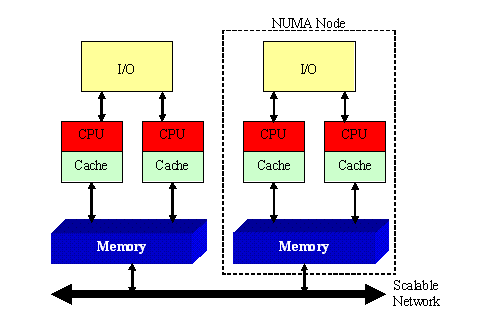
Understanding NUMA Architecture is essential for maximizing the performance of multi-processor servers. By ensuring that applications access memory located close to the processor executing them, organizations can reduce memory latency, improve resource utilization, and achieve better overall system performance.
 2019 - 2023 © WELNIZ.LTD. All rights reserved.

 United Arab Emirates (Arabic)
 Worldwide (English)